
Workflow approval software built from how your team already works
Describe your approval process in plain English. Achi turns it into a working app with forms, stages, roles and approvals.
Multi-stage approvals run on Achi Professional.
Professional: £149 /mo + VAT where applicable, Billed monthly · approx. $199 /mo, Indicative price. Payments are processed in GBP. Your bank may apply exchange rates or conversion fees.
When someone needs to buy something, they submit a purchase request with the item, supplier, amount and reason. Their line manager approves it, then finance checks it against the budget. Anything over a set amount also needs CFO approval.
Try this prompt14-day free trial with Professional features
No credit card needed.
- Request
- Manager
- Finance
- CFO over amount
- Approved
Where is the request?
Once a request goes out by email, there's no single place that shows which stage it has reached.
Was it approved?
The approval is a reply somewhere in a long thread, so people ask again to be sure.
Is the tracker up to date?
The spreadsheet shows what someone last typed in, not where things stand today.
What is workflow approval software?
Workflow approval software turns a request, such as a purchase request, an invoice or a new supplier, into defined stages where named people review and approve it. It replaces approvals that run through email chains and spreadsheets. Achi builds this as an app from a plain-English description of your own process, with forms, stages, roles and approvals.
- Collects each request through a form, which people outside your organisation can fill in from a link without an Achi account
- Routes each request to the right person at each stage, including stages that only apply over an amount you set (Ask Achi builds on Professional)
- Emails the next approver when a request reaches their stage (processes built with Ask Achi)
- Lets you see where each request is (Process Monitor, on Professional)
Turn your approval process into a working app
- 1
Describe it
Write your process the way you'd explain it to a new colleague: who asks, who checks, who approves.
DEMO DATA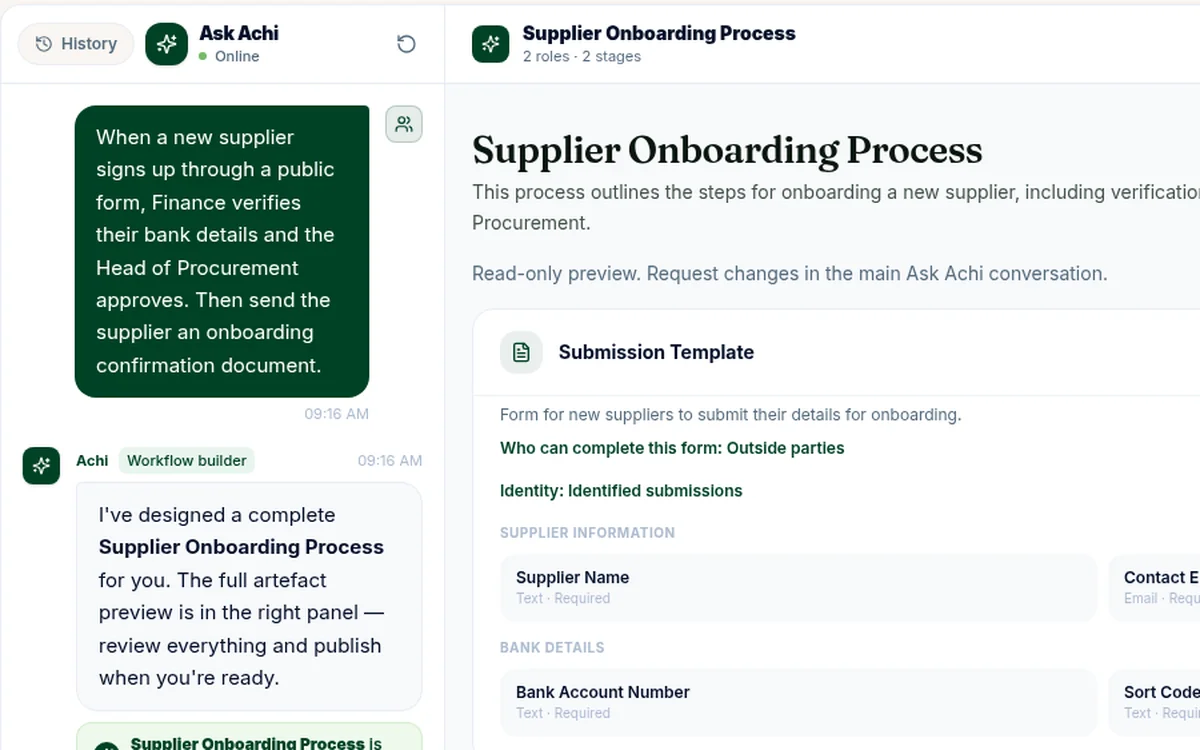
1Describe it Describe the approval process in plain English in Ask Achi. - 2
Review the draft
Achi shows you a draft of the app to review.
DEMO DATA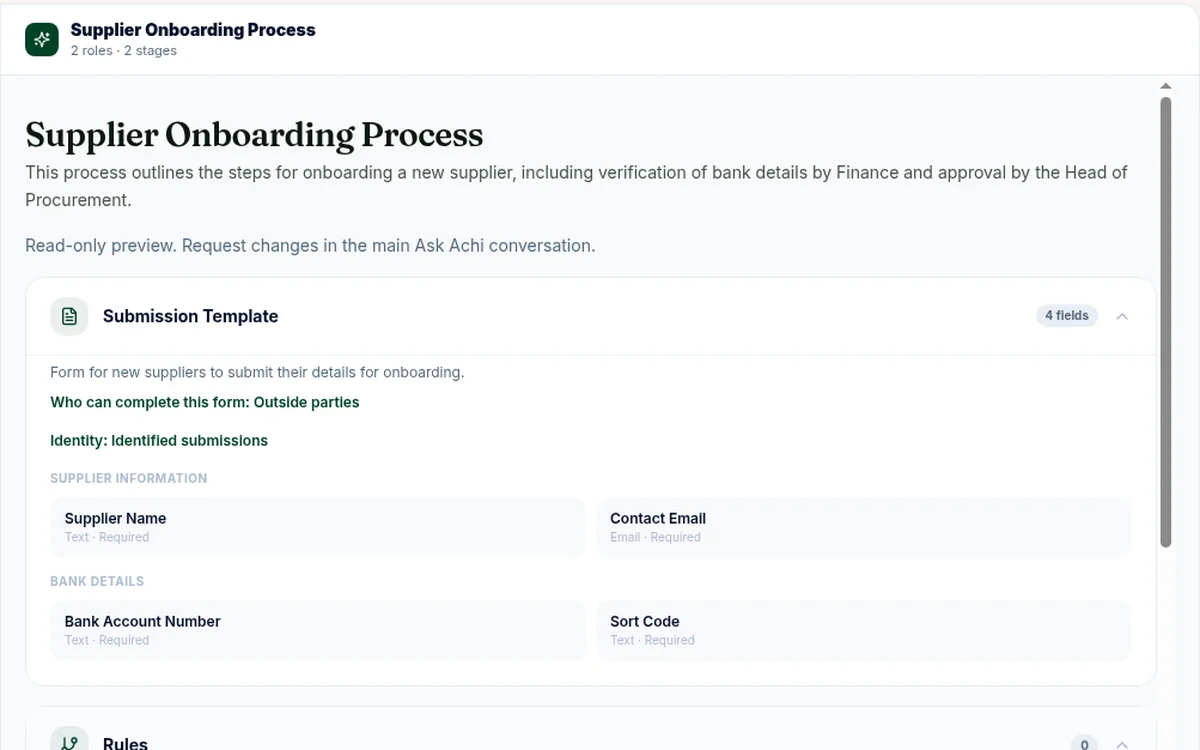
2Review the draft Ask Achi drafts the form, roles and stages for you to review. - 3
Refine in plain English
Ask for changes in your own words.
- 4
You confirm, then it's live
Each stage can only be approved, sent back or edited by the people assigned to it.
DEMO DATA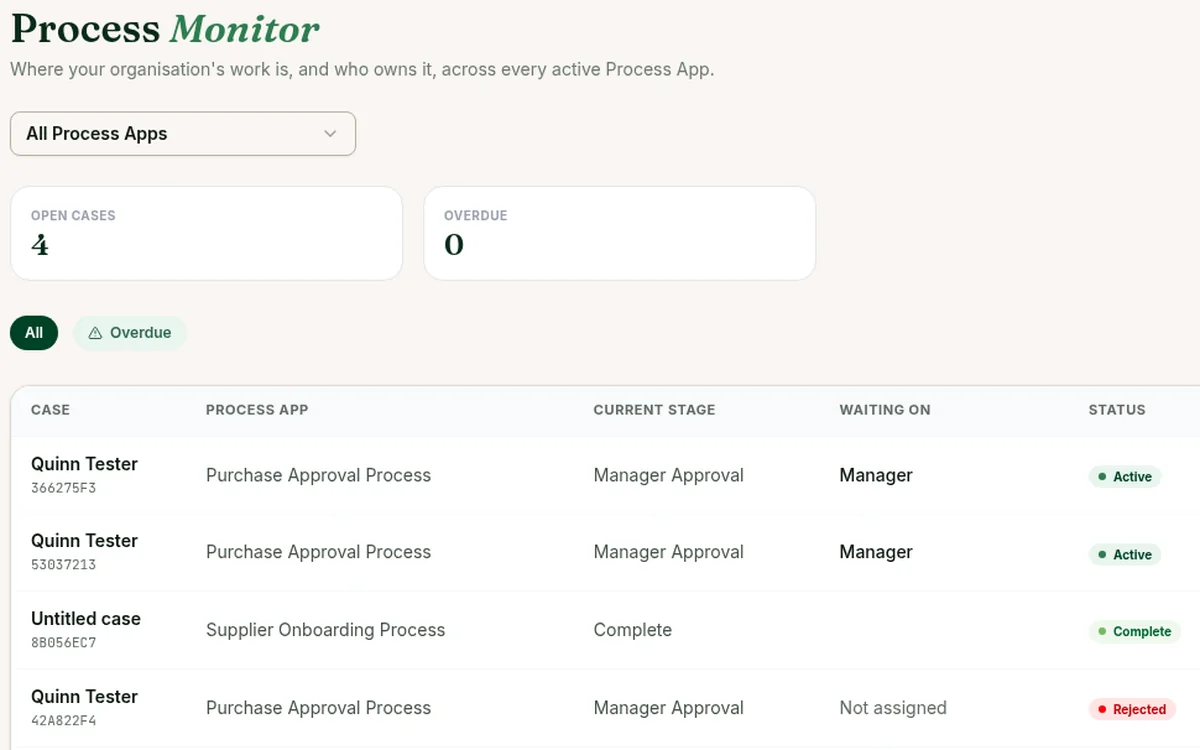
4You confirm, then it's live Once live, Process Monitor shows every request's stage, owner and due date.
What an approval workflow looks like in Achi
- Request
- Manager
- Finance
- CFO over amount
- Approved
| Stage | Who acts | What they do |
|---|---|---|
| Request | Requester | Fills in the purchase request form |
| Manager approval | Line manager | Approves, sends back or rejects |
| Budget check | Finance | Approves, sends back or rejects |
| CFO approval (only over an amount you set) | CFO | Approves, sends back or rejects; marked 'Not required' under the amount |
| Approved | — | Request complete |
Approval workflows you can build with Achi
Each is an example process you adapt to your own team.
Supplier onboarding
Supplier fills in a form from a link → Finance checks the details → Procurement approves
See how →
Control for finance, procurement and ops
Each stage can only be approved, sent back or edited by the people assigned to it.
Approvals and send-backs at each stage.
Data is encrypted in transit and at rest by our hosting providers.
Each organisation's data is logically separated, with database rules that stop one organisation seeing another's.
Achi's AI proposes. Your people review and publish.
Built by Dormot Technologies Ltd, a UK-registered company (company number 15927545).
Workflow approval software compared: email and spreadsheets, Kissflow, Microsoft Power Automate, monday.com and Achi
These tools come at approvals from different starting points: a shared sheet, a no-code platform, flows built alongside Microsoft 365, work boards, or a written description of your process. Kissflow, Microsoft Power Automate and monday.com each also offer an AI option that drafts a workflow from a description, so the table compares how each one is set up and who it tends to suit, not which one wins.
| Topic | Email + spreadsheet | Kissflow | Power Automate | monday.com | Achi |
|---|---|---|---|---|---|
| How you set it up | A shared sheet and email threads | Configure workflows and forms in a no-code builder, or describe the app in plain language and Kissflow AI generates a draft you refine (see vendor) | Build flows from triggers and actions, or start from a Copilot description, often alongside Microsoft 365 apps | Configure boards, statuses and automations, or describe a process in plain language and the AI workflow builder generates the workflow (see vendor) | Describe your approval process in plain English; Achi drafts the whole app (forms, stages and roles) for you to review |
| Who it suits | Very low volume, one owner | Teams that want a general no-code workflow platform | Organisations on Microsoft 365 with people who can build and maintain flows | Teams already managing their work in boards | Mid-sized teams that want their own approval process running without building it step by step |
| Pricing | No extra cost | See the vendor's site | Licensing varies by Microsoft plan | See the vendor's site | Professional: £149 /mo + VAT where applicable |
Kissflow, Microsoft Power Automate and monday.com are trade marks of their respective owners. Achi is not affiliated with or endorsed by them. Descriptions are based on each vendor's public information as at 18 October 2026. Check each vendor's site for current features and pricing.
When another tool is the better fit
Kissflow may suit you better if approvals are one part of a wider plan to build many business apps under IT's control. Kissflow describes its AI builder as creating apps such as portals and trackers, not only approvals, and positions itself as a governed layer around systems of record such as SAP, Oracle, Salesforce and Workday. Microsoft Power Automate is a strong choice if you already run on Microsoft 365 and have someone to build and maintain flows. Microsoft describes it as automating work in Excel, OneDrive or Teams without switching applications, and Copilot can draft a flow from a description. monday.com suits teams that already run their work on boards. Its AI workflow builder can turn a plain-language description into a workflow, and an approval checkpoint can pause that workflow until a named person approves. Achi is built for a narrower job: you describe one approval process in plain English, review the app Achi drafts, and run multi-stage approvals on Professional.
Pricing
Multi-stage approvals run on Professional.
Starter
£29 /mo
Billed monthly
+ VAT where applicable
approx. $39 /mo
Indicative price
approx. €35 /mo
Indicative price
Single approval stage only.
For multi-stage approvals
Professional
£149 /mo
Billed monthly
+ VAT where applicable
approx. $199 /mo
Indicative price
approx. €179 /mo
Indicative price
Multi-stage approvals.
Get started with ProfessionalBusiness
£449 /mo
Billed monthly
+ VAT where applicable
approx. $599 /mo
Indicative price
approx. €549 /mo
Indicative price
See the pricing page for what's included.
Enterprise
Book a demoCustom
Payments are processed in GBP. Your bank may apply exchange rates or conversion fees.
Monthly prices. 14-day free trial with Professional features. No credit card needed. See the pricing page for full plan details.
Is Achi the right approval workflow software for you?
Good fit
Mid-sized teams that want their own multi-stage approval process running on Professional, without developers.
Not the right fit
Teams that need approvals synced automatically into an ERP or accounting system, invoice matching, e-signatures or a portal where outside parties track their request.
Achi's interface is in English.
Workflow approval software FAQ
What is workflow approval software?
Workflow approval software turns a request, such as a purchase request, an invoice or a new supplier, into defined stages where named people review and approve it. It replaces approvals that run through email chains and spreadsheets. Achi builds this as an app from a plain-English description of your own process, with forms, stages, roles and approvals.
How does Achi create an approval workflow?
You describe your approval process in plain English: who submits the request, who reviews it, and who gives final approval. Achi builds an app with the forms, stages, roles and approvals, and shows you a draft to review. You confirm, then it's live.
Do I need developers to set it up?
No. You describe the process in plain English and Achi builds the app. You review it and publish when ready.
What kinds of approvals can I describe in Achi?
Approval processes with clear steps, people and decisions, such as purchase requests, supplier onboarding and invoice approvals. You describe your own process and Achi builds the forms, stages, roles and approvals for it. With Ask Achi on Professional, a stage can also apply only over an amount you set, such as a CFO sign-off.
Who approves each stage, and how do they know?
Each stage can only be approved, sent back or edited by the people assigned to it, and approvers can also reject a request with a reason. When you build a process with Ask Achi, the next approver is emailed when a request reaches their stage and opens the request in Achi to decide.
Can people outside our organisation submit requests?
Yes. You can send a form link to people outside your organisation, such as suppliers. They fill it in without needing an Achi account.
Which plan do I need?
Approval workflows with more than one stage, such as a manager approval followed by a finance check, run on Professional, which is £149 /mo + VAT where applicable. Starter covers a single approval stage. See the pricing page for details.
How do I try Achi?
Start a 14-day free trial with Professional features. No credit card is needed, and you sign up with your work email or a Google account.
Does Achi connect to our ERP or accounting system?
Not yet. Achi doesn't connect to ERP or accounting systems today. It runs your approval steps. Once a request is approved, your team updates your finance system as usual. If an integration matters to you, tell us which system you use.
Describe your approval process. Review the app. You confirm, then it's live.
- Request
- Manager
- Finance
- Live
Professional: £149 /mo + VAT where applicable, Billed monthly · approx. $199 /mo, Indicative price. Payments are processed in GBP. Your bank may apply exchange rates or conversion fees. 14-day free trial with Professional features. No credit card needed.